 BusSing
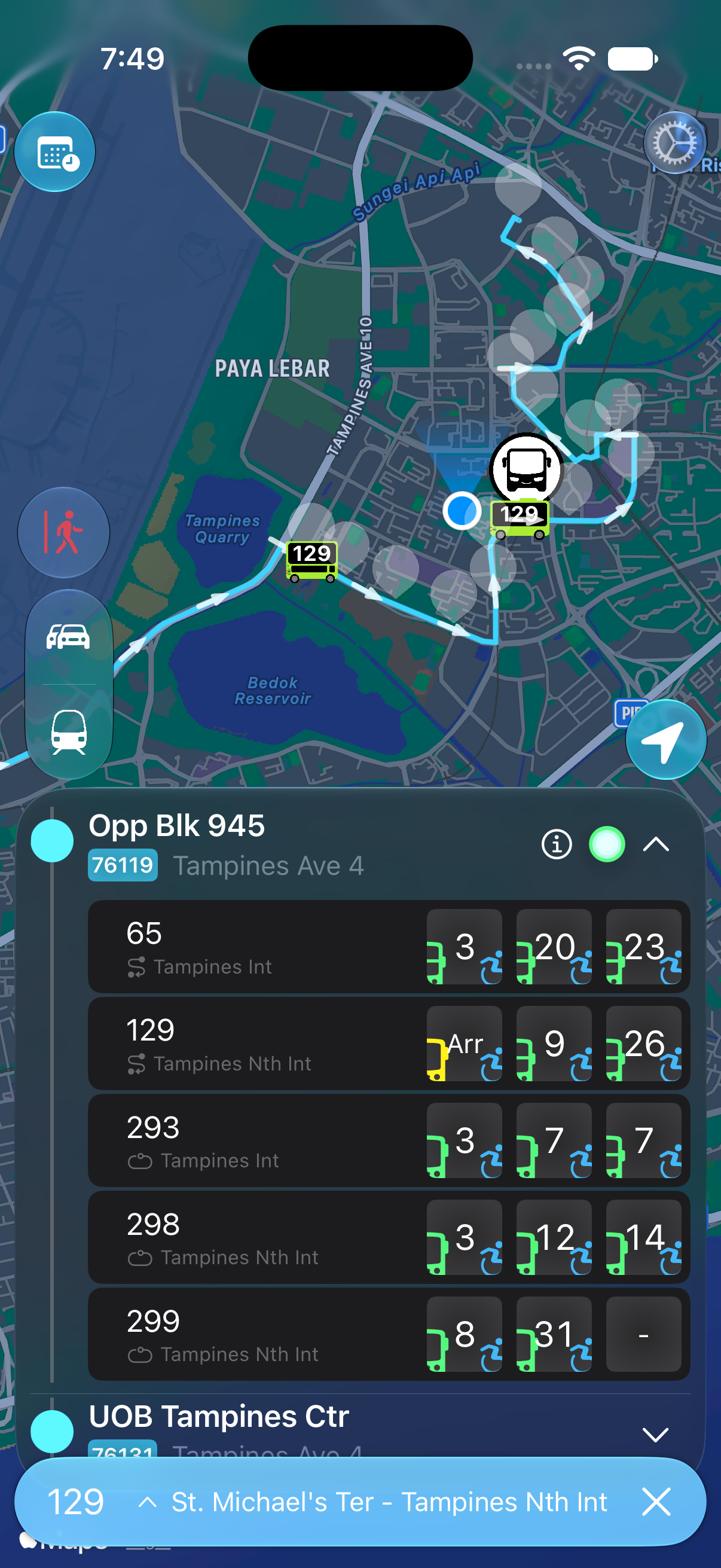
In BusSing, open a bus route at your boarding stop and tap the calendar icon at the top left to check last-bus data. Confirm the stop and direction, then follow live arrivals as you get ready to leave. An empty arrival list alone does not confirm that your service has ended.
Start with the stop where you will board
Record the service number, boarding stop code and destination shown for that direction. If you are leaving a restaurant or a friend's place, check the stop you can actually walk to. Your usual stop near home is not the one you need tonight.
Read the schedule heading carefully. A last departure from an interchange is different from the scheduled last arrival at a stop farther along the route. LTA's route dataset includes first and last timings for individual stops. Use the timing for your boarding stop when it is available, rather than adding a daytime journey estimate to an interchange departure.
Tap the calendar icon in BusSing
You can check last-bus data without leaving BusSing. The calendar icon is at the top left when you view a bus route at a stop.
- Open the bus stop where you will board.
- View the route for your chosen service and confirm the direction.
- Tap the calendar icon at the top left to check the last-bus data.
Check the operator for more schedule information
If you need to confirm a timing or check a service notice, use the operator's official service information. SBS Transit has a service selector with route and first/last-bus details. Go-Ahead Singapore lists its services and links to their schedules. SMRT has a bus service search, and Tower Transit's homepage lets you search for a bus service.
Choose the exact service number, including any letter suffix, and the direction you need. Check whether the time is labelled as a departure from the starting point or a timing at your selected stop. If the page only gives an interchange departure and you need a roadside-stop timing, consult the information at the stop or ask the operator.
- Find your service using the relevant operator link below.
- Select the direction towards your destination.
- Find your boarding stop and read the schedule heading.
- Check the last-bus time for the day you are travelling.
SBS Transit bus service information
Check the day and any service notices
Operator schedules can have separate columns for weekdays, Saturdays, and Sundays or public holidays. Read the relevant column and any footnotes. Pay attention to times after midnight so you know which night the service belongs to.
Check current operator notices for temporary changes, diversions or special service extensions. An old announcement about extended buses on a holiday is not a timetable for tonight. Use its effective date to decide whether it applies to your journey.
Use live arrivals after checking the schedule
Open the same stop and service in BusSing to follow its current arrival estimate. Leave time for the walk, crossings and finding the correct boarding point. Do not aim to reach the stop at the final minute of a countdown.
LTA distinguishes missing arrival data during operating hours from a service that is not operating. It also notes that a late last bus can still have arrival data after its scheduled operating hours. A blank estimate needs another check; a visible estimate does not guarantee that another bus follows it.
Check the last connection as well
If you need to change buses or catch a train, check that connection separately. Include the ride to the transfer point and the walk between boarding areas. Catching the first leg does not establish that the second will still be running.
Choose a backup before leaving if the connection is tight. That might be a different route, an earlier departure or another way home. Keep the relevant stop codes handy so you can check them without starting the search again at a quiet bus stop.
Sources: LTA DataMall: bus arrivals and route schedules · LTA DataMall API guide: crowd levels and operating hours · SBS Transit bus service information · SMRT bus service search · Go-Ahead Singapore bus services · Tower Transit Singapore service search
Try it on your next commute.
Live Singapore bus arrivals, widgets and offline MRT maps. All in BusSing.