 BusSing

The next bus is close, but how crowded is it? Read the crowd indicator beside its arrival estimate before deciding whether to board or wait. Singapore bus data uses three levels: seats available, standing available and limited standing.
What green, amber and red mean
LTA lists three crowd categories. Its suggested colour scheme is green for Seats Available, amber for Standing Available and red for Limited Standing. Amber can look yellow in an app. These colours describe the reported crowd level of an individual bus.
Seats Available means the data reports seating space. Standing Available points to standing space rather than an available seat. Limited Standing means standing space is limited. A red indicator does not tell you an exact passenger count or prove that boarding is impossible.
LTA bus service search and crowd-level legend
LTA DataMall API guide: crowd levels and operating hours
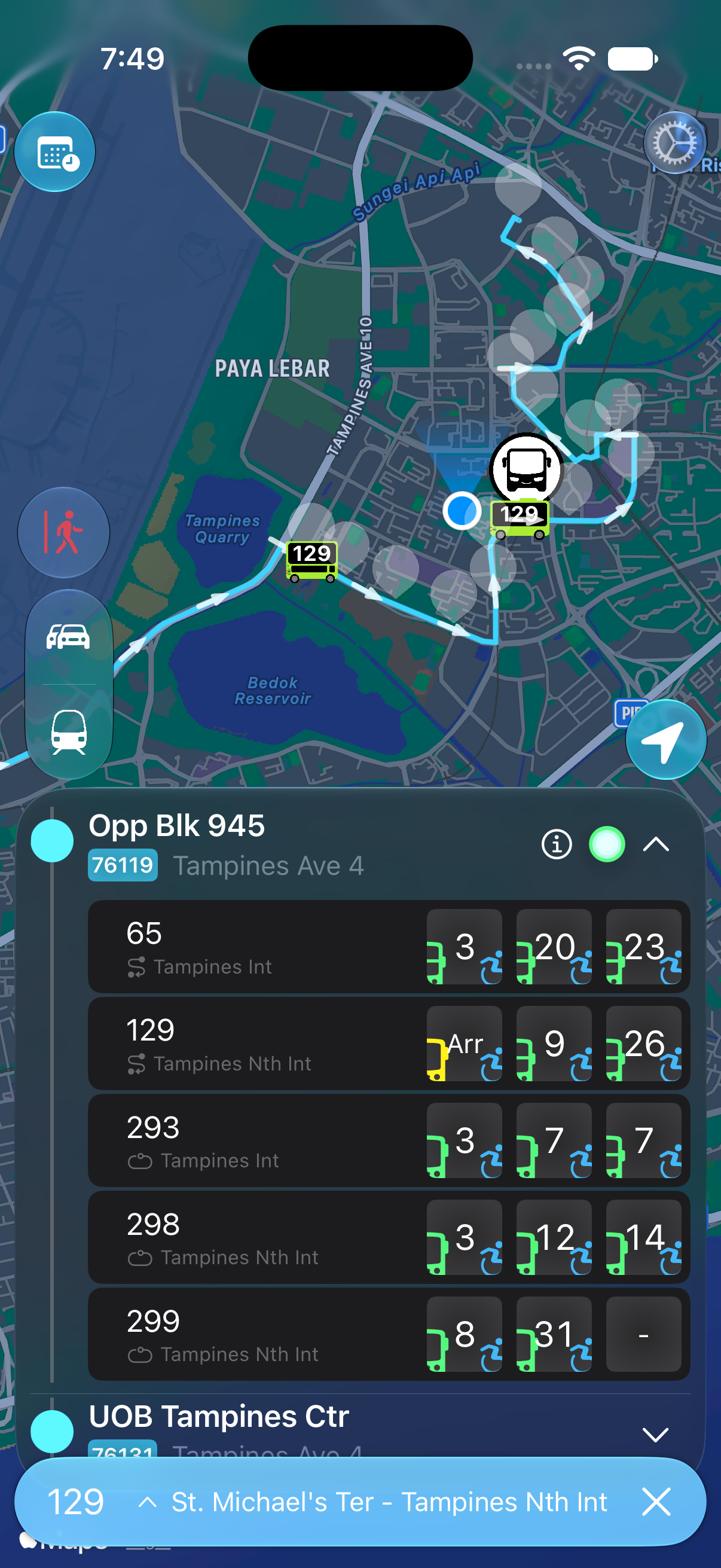
Read the indicator for the bus you want
Keep the crowd indicator and countdown together. In BusSing, bus icons sit beside the individual arrival estimates. A less crowded later bus tells you nothing about the space on the bus arriving first.
Check the service destination too. Two services at the same stop may both have green indicators and still take you to different places. Confirm that the bus serves your alighting stop before comparing the wait.
Decide whether the extra wait suits your journey
Suppose the first bus is two minutes away with limited standing space, while the next is eight minutes away with seats available. For a long ride with no appointment to rush to, you might prefer to wait. For a short ride, you may choose the first bus if you can board comfortably.
Before letting a bus go, check the later estimate again and consider another service that reaches your destination. Near the end of service, confirm the last-bus schedule before choosing to wait. A more comfortable ride is little help if you miss your way home.
Treat the indicator as a guide
The crowd category describes reported occupancy, so treat it as a guide to what you may find. Passengers can board or leave before the bus reaches you. Seats available is not a seat reservation, and the category does not say whether a particular seat is free.
Wheelchair accessibility is a separate field in LTA data. A wheelchair symbol identifies an accessible bus; it does not confirm that its wheelchair space is vacant. Ask the bus captain for assistance when you need it.
If the crowd information is missing
An absent indicator is not evidence of an empty bus. Check the current arrivals inside BusSing and your internet connection. If the information remains unavailable, judge the space when the bus arrives rather than guessing from a blank display.
Sources: LTA bus service search and crowd-level legend · LTA DataMall API guide: crowd levels and operating hours · LTA DataMall: bus arrivals and route schedules
Try it on your next commute.
Live Singapore bus arrivals, widgets and offline MRT maps. All in BusSing.